
Dead Zones Inspector
A 3D diamond rendered under Office, ASET, Octonus Zone and Dead Zones light, to find the areas that stay dark.
A dead zone is an area of a polished diamond that returns no light to the viewer and looks dark. The Dead Zones Inspector renders a 3D model of a diamond under several lights, so the dark areas show where they are and how large they are. It opens without a Cutwise account.
Samples
Dead Zones Inspector
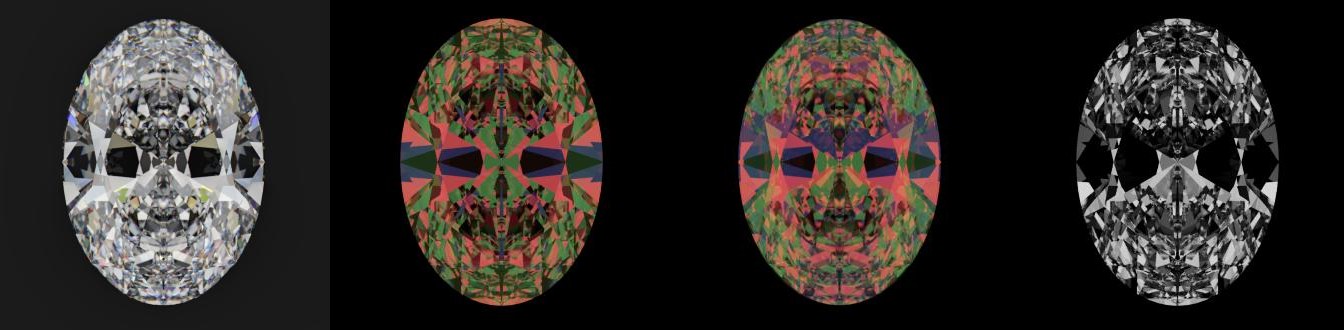
Left to right: Office · AGS ASET · Octonus Zone · Dead Zones.
Look at the dark band across the middle of the oval. It is a bow tie, a dead zone, and the Dead Zones light shows it as black. AGS ASET is the light of the American Gem Society's Angular Spectrum Evaluation Tool. It colors each area of the diamond by the angle its light comes from.
The page opens with nine short video lessons, from what dead zones are to grading them on a 3D model. Study Your Diamond opens the tool itself.
| Mode | What it does |
|---|---|
| Inspect | Rotates one diamond under the chosen light |
| Compare | Puts two diamonds side by side under the same settings |
| Grade | Grades dead zones of the diamond |
The tool offers five lights: Office, Fire, AGS ASET, Octonus Zone and Dead Zones. It also offers three ways to look at the diamond: Cyclops Vision for one eye, Brain Stereo Vision, and a left and right eye pair. The Cutwise samples include an oval with a bow tie, a nailhead round and a shallow round. Share makes a link that opens the same diamond, light and view.
Where the data comes from
Cutwise renders the diamond from its 3D model in real time, in the browser.
Get it for your diamonds
Upload my diamond model in the tool adds your own 3D model to the list. Uploading needs a Cutwise account. Your models stay in the list under My diamonds, where you can rename, delete or reorder them.
Related
- Ray Path in a Round Diamond explains why some areas of a diamond return no light.
- Sweet Lines shows the proportions with the best light return.