 Documentation
Optical Performance Scores in the API
How the API encodes Fire, Brilliance, Spread and Fluorescence scores and their scale.
The scores object of a diamond in Diamonds API v4 and
Diamonds API v3 holds the Cutwise Optical Performance Scores. This page
explains the score fields and shows how a client draws a score on the grade scale. A worked example
is in Example for the Fire score.
Score fields
The scale format on this page applies to these Cutwise Scores: Fire, Brilliance and Cut Performance.
| Field | Description |
|---|---|
score.val |
Absolute score value. It is not normalized to mass or area. |
score.rg |
Relative grade value, normalized to a Round cut with the same projection area. |
score.d |
Calculation error (dispersion). |
The client shows absolute scores as they are.
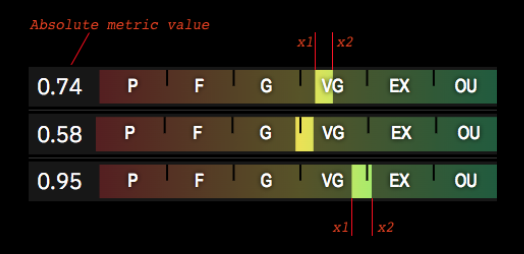
Score scale marker
The score scale marker is the part of the scale between the bounds x1 and x2. The client
paints it with a brighter gradient than the rest of the scale.
x1 = score.rg - score.d;
x2 = score.rg + score.d;
The client places x1 and x2 separately. Each point is placed by linear interpolation inside the
scale segment it falls into. Both points can fall into the same segment.
Score scale segments
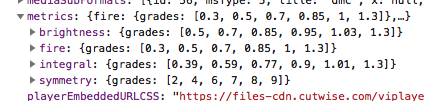
The Constants API returns the segment boundaries for each score.
Note
The lower bound of the Poor grade is always 0.
Note
The Outstanding (OU) grade has no upper limit. The last value in the API (for example, 1.3 for Fire) only makes it easy to normalize to the OU grade, so the client does not normalize between 1 and infinity. If a value is above the last boundary, treat it as equal to that boundary.
Note
A point that lies exactly on the boundary between two grades belongs to both grades.
Example for the Fire score
score.rg = 0.73
score.d = 0.05
x1 = 0.68
x2 = 0.78
x1 lies between the second (0.5) and the third (0.7) segment boundary. Linear interpolation puts
it close to the 0.7 boundary.
x2 lies between the third (0.7) and the fourth (0.85) segment boundary. Linear interpolation puts
it at about the middle of the segment.
On the drawn scale, the marker covers 20% on the right side of the G segment (grade Good) and 53% on the left side of the VG segment (grade Very Good).
Note
The Symmetry score marker uses the same scheme, but with the absolute value (*.val) instead of
the relative grade (*.rg).
Spread scores
"spread": {
  "ct": -0.19,
  "pc": -14.2,
  "d": 0.1,
  "ver": "1.0.0"
}
The Octonus Spread parameter is explained in OctoNus spread & AGS spread.
| Field | Description |
|---|---|
spread.ct |
Absolute spread, in carats. |
spread.pc |
Relative spread, in %. |
d |
Accuracy of spread.pc. |
Fluorescence scores
The Fluorescence score values form a histogram:
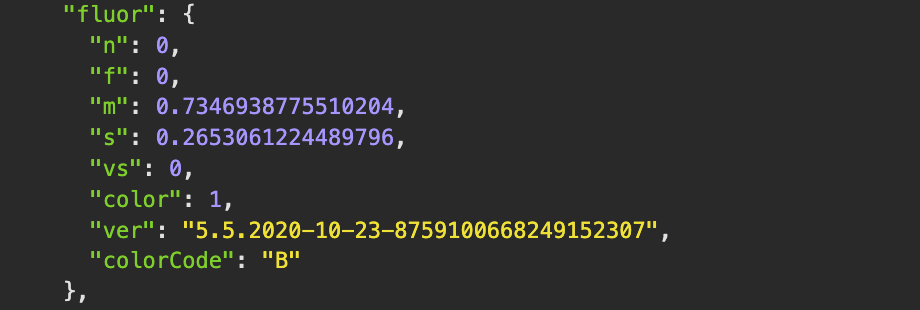
Each value is in the range [0;1], where 1 is the maximum (100%).
A client can draw the Fluorescence score as a bar chart:

| Field | Grade |
|---|---|
score.f |
Faint (FNT) |
score.m |
Medium (MED) |
score.n |
None (NON) |
score.s |
Strong (STR) |
score.vs |
Very Strong (V STR) |
score.colorCode is the face-up fluorescence color code. The codes are listed in
Diamonds API v4 accepted values.