
FCRF Price Estimate
Price a planned fancy diamond on the FCRF price scale, and find out why the Evaluate Price button can be greyed out.
Price a planned diamond graded fancy on the Fancy Color Research Foundation (FCRF) price scale, straight from its card. Example diamonds cannot be priced, because they are not real diamonds in Cutwise. They show FCRF subgrades but no price.
Before you start
- You are the owner of the diamond, or Octonus staff allowed to run services. On a demo diamond, anyone can evaluate. Other viewers see the price once it exists, but not the button.
- The diamond meets the FCRF requirements. See Why the button is greyed out.
Getting a price
-
Click Evaluate Price on the card of a planned diamond. The FCRF grading page opens for that diamond.
-
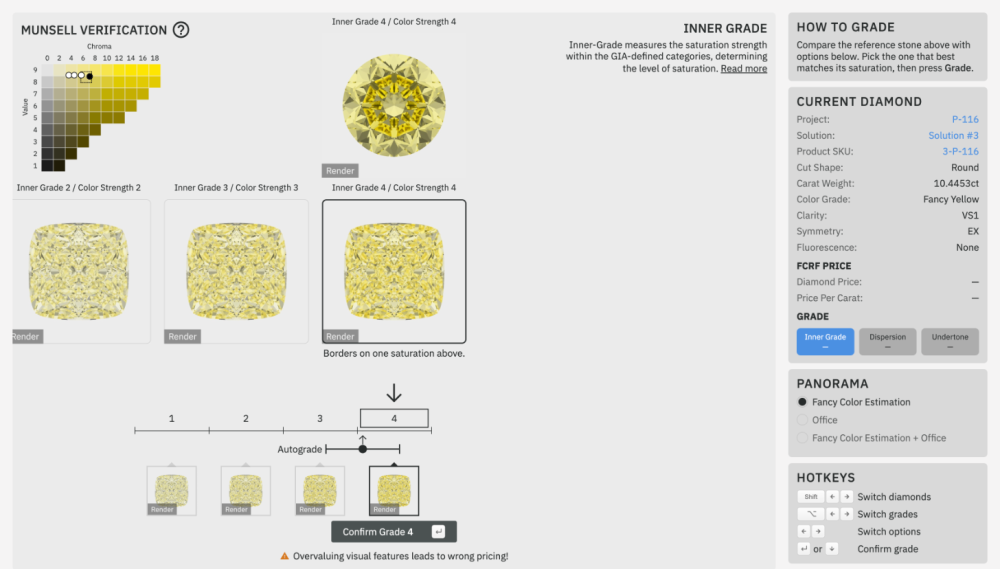
Grade the three FCRF subgrades in turn. Each step shows the render of the diamond at the top and the FCRF reference diamonds below it.
Step FCRF subgrade Shown on the card as 1 Inner Grade Inner Grade in FCRF Subgrades 2 Dispersion Dispersion in FCRF Subgrades 3 Undertone Undertone in FCRF Subgrades The scale under the references starts at the Autograde, the grade Cutwise suggests. Pick the reference that matches the diamond best. Click Confirm Grade N, or press Enter.
-
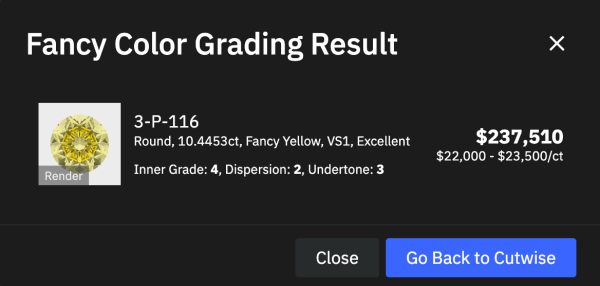
After the third subgrade, the Fancy Color Grading Result shows the price. Click Go Back to Cutwise to return to the rough diamond.
Warning
The page warns Overvaluing visual features leads to wrong pricing! The price follows the grades you confirm. Confirm what you see, not what you hope for.
Check the result
Cutwise saves the result to the diamond:
- the FCRF grade, which the card then shows in the FCRF Subgrades row;
- the price: an average price and a price range per carat.
From then on, the card shows the FCRF price instead of the button.
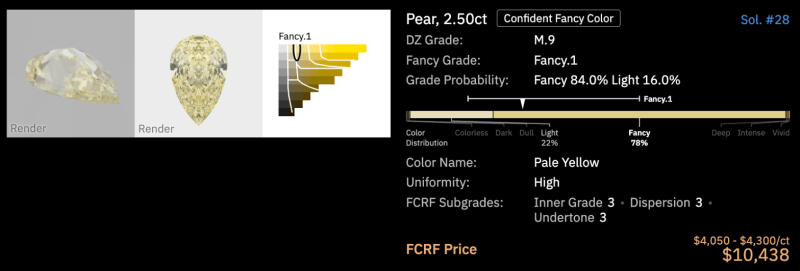
Before you confirm a grade, a planned fancy diamond of an FCRF hue and grade shows an initial FCRF grade. Cutwise derives it from the metrics of the diamond. The confirmed grade replaces it.
On the diamond page, Refetch Price next to the price updates the price from the latest FCRF catalog. You do not have to grade the diamond again.
Why the button is greyed out
FCRF covers only part of the fancy diamonds. A diamond qualifies when it has:
- a Yellow, Blue or Pink hue;
- a grade of Fancy Light, Fancy, Fancy Intense, Fancy Vivid or Fancy Deep;
- a Round, Cushion, Radiant, Oval, Pear, Heart or Emerald cut;
- a clarity from FL to SI2;
- a weight between 1 and 30 carats;
- a Fancy Color Estimation photo and a report with its length and width.
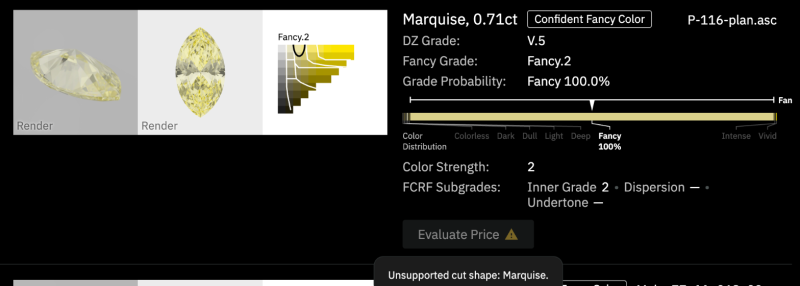
A greyed-out button has a warning icon. Hover over the icon to see the first requirement the diamond does not meet. A diamond that misses several requirements shows one reason at a time.
| Message | Cause |
|---|---|
| You do not have permission to request an FCRF estimate. | you are not the owner |
| Product report data is missing. | the diamond has no report |
| Media is missed in product. | the Fancy Color Estimation photo has not been rendered yet |
| No data provided for: … | the report does not have the listed value: cut shape, color, clarity, length, width |
| Unsupported cut shape: … | the cut is not one of the seven FCRF shapes |
| Unsupported color hue: … / Unsupported color grade: … | the hue or grade is outside FCRF |
| Unsupported clarity: … | the clarity is below SI2 |
| Carat weight must be between 1 and 30. | the weight is outside the FCRF range |
The checks run in the order of the table. So a 0.71 ct marquise reports its shape, not its weight.
Right after an estimation, the usual cause is the photo. The diamond has just been flagged as fancy color, and its fancy-mode render is still in the queue. The button starts working some minutes later.