
Images and Color Map
The three tiles at the top of a result card - two renders of the estimated diamond and its color on the Munsell map or the D–Z scale.
Every card in the Color estimation block starts with three tiles. The first two show the estimated diamond, the third shows its color. The tiles do not change the grades. They show you what was estimated.
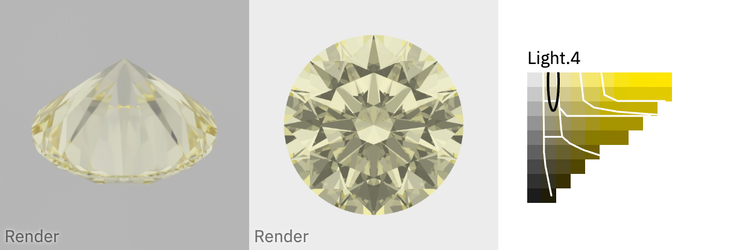
The tiles
| Tile | Title | Shows |
|---|---|---|
| First | Viewing angle for DZ grading — shape, weight | a still render of the diamond table down, the viewing angle for D–Z grading |
| Second | Viewing angle for Fancy Color grading — shape, weight | a still render of the diamond face up; the fancy grade and the Uniformity are read from this render |
| Third | Color of shape, weight | the color map or the D–Z scale, see below |
D–Z grading looks at the diamond table down. Fancy grading looks at it face up. These are two different questions, so the two answers can differ. The verdict says which one applies.
Both renders carry the word Render in the corner. They are images of a diamond that does not exist yet, rendered through the spectrum of the rough diamond. They are not photos.
When a render is missing, its tile is grey and reads Render unavailable. Such a tile does not open.
Enlarging a tile
Click a tile to open it in a window. The window carries the title of the tile, for example Viewing angle for DZ grading — Round, ~0.63ct. Click × to close it.
| Verdict | Both render tiles open |
|---|---|
| Confident Fancy Color or Borderline | the same looping video render of the diamond, with a mute button |
| Confident DZ | the still render of the tile, enlarged |
The first tile opens the same video as the second, not a separate D–Z video.
The color map
The third tile shows the color map when the verdict is not Confident DZ and the diamond has a fancy grade. The caption above the small map is the Fancy Grade of the card, such as Light.4.
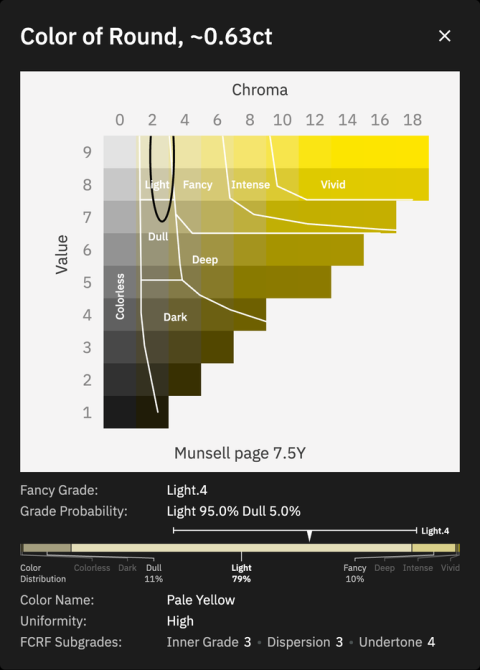
The map is one page of the Munsell color system:
- Value, from 1 to 9 upwards, is the lightness of the color.
- Chroma, from 0 to 18 to the right, is its saturation.
- The hue page is named under the enlarged map, for example Munsell page 7.5Y.
- White lines mark the fancy zones. They divide the page into the eight zones of the fancy grader: Colorless, Dull, Dark, Deep, Light, Fancy, Intense and Vivid.
- The black ellipse marks the color of this diamond.
The map shows why two diamonds with the same grade can look different. Fancy, Fancy Intense and Fancy Vivid are set by lightness and saturation together, and the saturation inside one grade can vary several-fold. So two diamonds with the same grade can sit far apart on the map. Look at the ellipse, not only at the grade.
The enlarged map has the title Color of Round, ~0.63ct. Under it, the window repeats every grade of the card except the DZ Grade: Fancy Grade, Grade Probability, Color Distribution, Color Name, Uniformity and FCRF Subgrades.
The D–Z scale
For a Confident DZ diamond, the third tile shows the D–Z scale instead of the map. The letters D to Z run from left to right, and a black dot marks the D–Z grade of the diamond.
When the card has neither a color map nor a D–Z scale, it shows only the two render tiles.