
Reading the Results
What the Color estimation block on the rough diamond page shows, element by element, and which decisions about the rough diamond it supports.
The Color estimation block on the rough diamond page shows the results of Rough Color Grading and of plan estimation. It answers with a color range, not a single grade, because one rough diamond gives different colors depending on how it is cut.
What the results are for
The block helps you decide three things about a rough diamond before anything is measured or polished:
- Whether to buy it, for example whether to bid for it in a tender.
- Which line to send it to, and which designs to consider when you plan it.
- Whether it justifies a spectrometer measurement, with the window polishing this needs.
Rough Color Grading does not replace a spectrometer. It tells you which rough diamonds are worth measuring with one.
Every weight, grade, color name and subgrade in the block is computed from the reconstructed spectrum and a model of the diamond. None of them is measured on a cut diamond.
Every number in the block rests on the reconstructed spectrum, so check the spectrum first. Estimate Color → Verify Estimated Spectrum shows the rough model rendered through that spectrum next to the real ViBox 2.0 frame of the same rough diamond. If the render and the photo differ, do not trust the color estimate. See Checking the spectrum.
Where the block appears
The block appears on the rough diamond page under the Seller Note when Rough Color Grading is Done, that is when at least two example diamonds are graded. After that, every diamond that is ready shows, including the planned diamonds you add later.
Everyone who can see the rough diamond sees the block, buyers included. A diamond of a private project stays hidden from anyone who could not see that project anyway.
Diamonds still in progress and diamonds whose estimation failed are not shown. If a diamond fails while the page is open, users who can run Rough Color Grading see a message with the reason.
Sections
The block has up to three sections. A section with nothing ready is not shown.
| Section | Holds | Comes from |
|---|---|---|
| Primary Diamond Color Range Estimate | a round at 35% and a radiant at 40% of the rough diamond | Rough Color Grading |
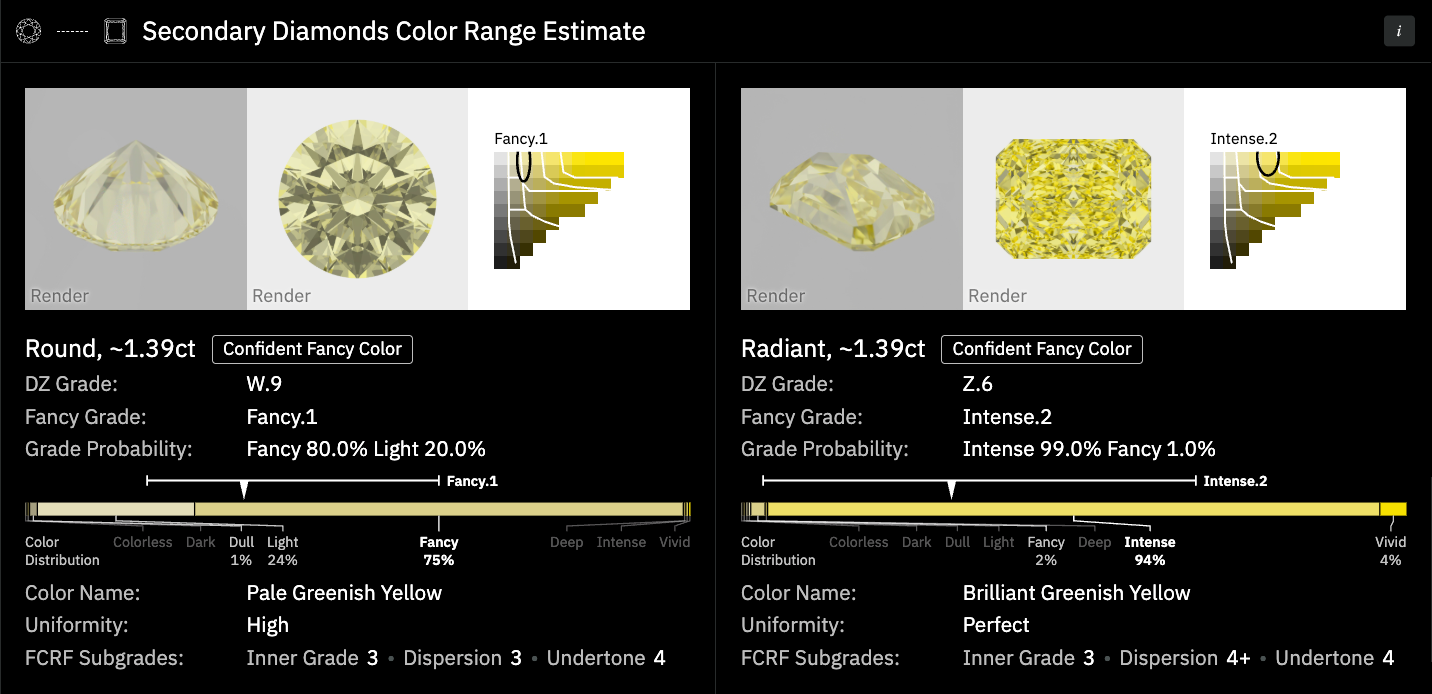
| Secondary Diamonds Color Range Estimate | a round and a radiant at 10% of the rough diamond each | Rough Color Grading |
| Planned Diamonds with Estimated Color | your planned diamonds, from a project or from files | plan estimation |
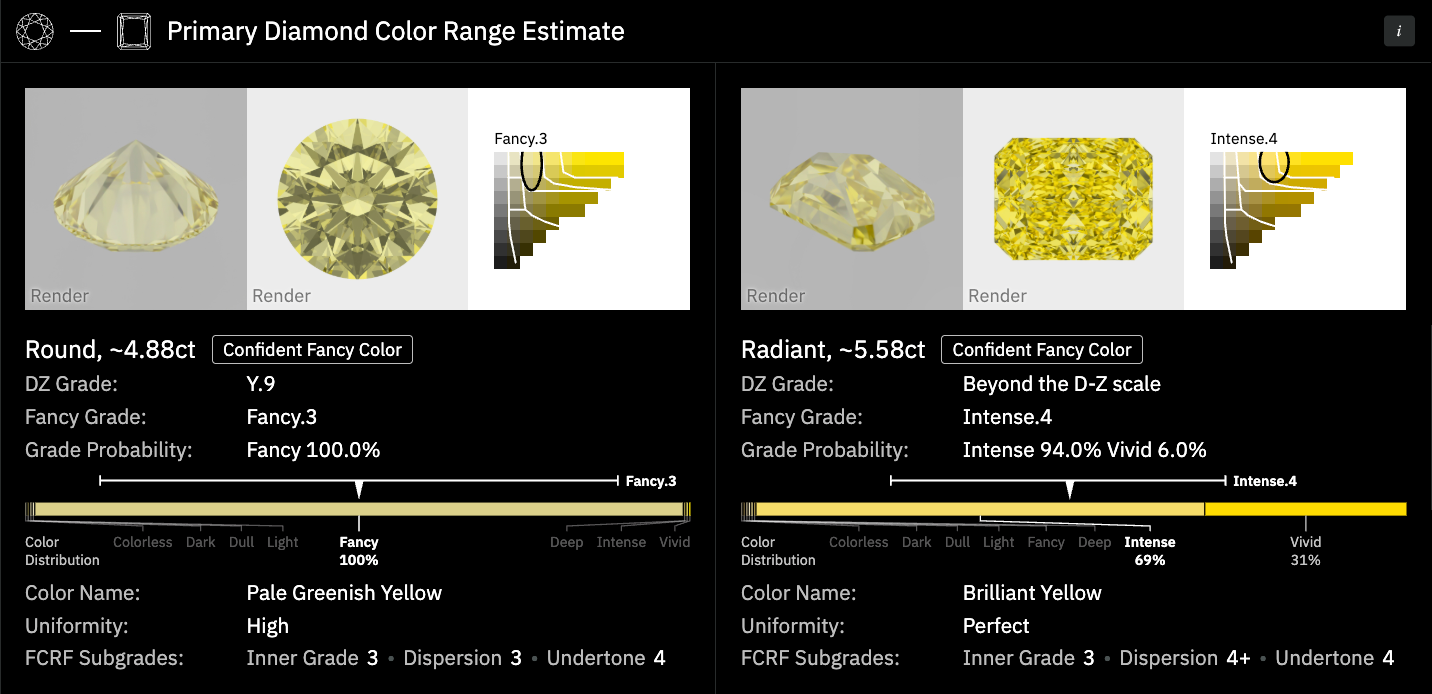
The two primary cards are the ends of the color range of the rough diamond. Light travels a short path through a round, so the round shows the palest color among the typical designs. A radiant has a long ray path, so it shows the most saturated one. A diamond of another design usually falls between the two. Read the color range from the primary cards only. The secondary cards show the same two shapes at 10% each, as context.
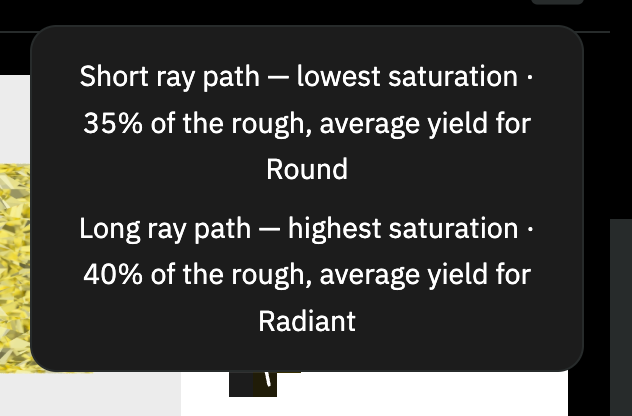
The header of the first two sections starts with the outlines of their shapes and ends with an i button. Click it to see one line per card:
| Section | Line |
|---|---|
| Primary | Short ray path — lowest saturation · 35% of the rough, average yield for Round |
| Primary | Long ray path — highest saturation · 40% of the rough, average yield for Radiant |
| Secondary | Short ray path — lowest saturation · 10% of the rough, average yield for a secondary Round |
| Secondary | Long ray path — highest saturation · 10% of the rough, average yield for a secondary Radiant |
The Planned Diamonds with Estimated Color section has no shape outlines and no i button.
A card
A card of the first two sections shows its parts in this order, top to bottom. A planned card puts the tiles on the left and the rest on the right.
| Part | What it shows | Details |
|---|---|---|
| Three tiles | a render for D–Z grading, a render for fancy grading, and the color map or the D–Z scale | Images and Color Map |
| Title | the shape and the estimated polished weight, such as Round, ~0.63ct | below |
| Verdict | Confident DZ, Confident Fancy Color or Borderline | Verdict and D–Z Grade |
| DZ Grade | the D–Z letter with a digit, such as U.3 | Verdict and D–Z Grade |
| Fancy Grade | the fancy zone with a digit, such as Light.4 | Fancy Grade |
| Grade Probability | the zone of the Fancy Grade with its probability, such as Light 95.0% Dull 5.0% | Fancy Grade |
| Color Distribution | a bar of the color shares over eight zones | Fancy Grade |
| Color Name | a general color name from the ISCC-NBS system, such as Pale Yellow | Fancy Grade |
| Uniformity | how evenly the color spreads, from Low to Perfect | Uniformity and FCRF Subgrades |
| FCRF Subgrades | the estimate on the FCRF scales, such as Inner Grade 3 • Dispersion 3 • Undertone 4 | Uniformity and FCRF Subgrades |
| Price | planned diamonds only: Evaluate Price or the FCRF price | FCRF Price Estimate |
A grade that was not calculated shows —. A row with nothing to show is hidden.
The title
The title shows the shape and the estimated polished weight, such as Round, ~0.63ct. The weight of an example diamond is the weight of the rough diamond times its yield.
A planned card also names its source on the right of the title line: the uploaded file name, or
Sol. #N with a link to the solution.
The pages
-
Images and Color Map
The three tiles at the top of a result card - two renders of the estimated diamond and its color on the Munsell map or the D–Z scale.
-
Verdict and D–Z Grade
What the verdict of a result card means, how Cutwise reaches it from two grades, and how to read the DZ Grade with its warnings.
-
Fancy Grade
Read the Fancy Grade of a result card with its digit, the Grade Probability line, the Color Distribution bar and the Color Name.
-
Uniformity and FCRF Subgrades
How evenly the color spreads over an estimated diamond, and the same estimate in the three FCRF subgrades that drive an FCRF price.